Looking back on this blog I can see that I have not kept to my attempt to write at least once a week.
Let’s hope I can do better over the coming weeks!
I left off with a post about changing over from BT’s FTTC to Vodafone’s FFTP broadband. After nearly eight months, how is that going?
Pretty good I have to report, if you’re connected directly to the Fibre Hub/Router by cable from my desktop PC, averaging over 900mb download speed with very good upload speeds. (See image below)
However, the download speeds via Wi-Fi have not lived up to expectations. Yes, if you’re close to the Vodafone Wi-Fi router, then you can get nearly 300/350 Mb download speeds. But if you start to move away from the there is quite a quick drop-off in attainable speeds. This for me points to a very low power Wi-Fi transmitter in the Vodafone Wi-Fi Hub.
I have seen this mentioned in a few online chats as well. Have also mentioned this to Vodafone, but so far no feedback from them.
Now investigating an alternate Wi-Fi router to use in conjunction with the Vodafone Hub.
A few weeks ago City Fibre finally finished digging up our road and moved on to other places, a short while later we received an email list available Full Fibre providers and out of the list we went for Vodafone.
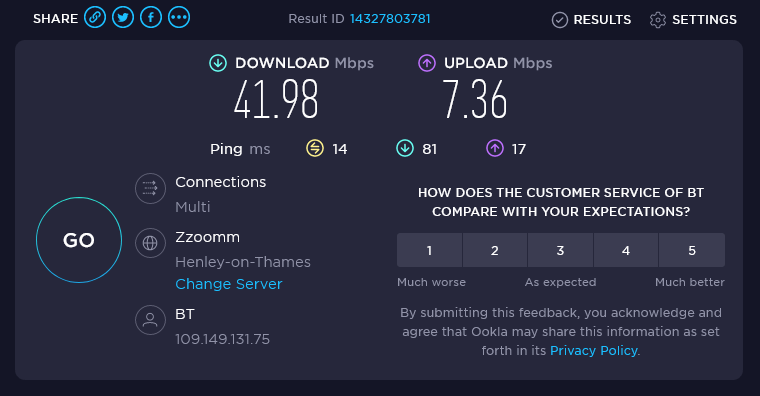
We had been a BT user for phone and broadband for many many years, from the early dial-up days right up to the latest speed that they could provide. Which only became available with their upgrade to their ‘Fibre To The Cabinet’ (FTTC) mechanism two years ago, which then delivered an average of 40Mb downloads.
Last Speed Test on BT Broadband
Although the FFTC did give a medium increase in downloading speed (doubling the previous speed) the last 50 meters from the cabinet to the house was still using copper wires. Despite a number of calls to BT over the last year, we were unable to get any kind of commitment that they were likely to replace that with ‘Fibre To The Premisses’ (FTTP). Hence, the move to another supplier for FTTP.
So how did the upgrade go? The actual physical connection work took around three hours to complete to a) run a sheathed fibre cable from the City Fibre connection port in the pavement next to the house, b) bury the cable under the front garden c) drill an access hole in the house wall to get the connection inside and finally d) to commission the connection via the new router which had been delivered a few days before.
No real issue with any of this except to say that Vodafone have been pretty cheap with the length of the cable on the mains adapter used to power the Broadband Router, it is only one meter long!! The mains adapter for the BT router is just over two meters long; so if you have positioned your previous router in a particular place for convenience/Wi-Fi reasons and you want to keep it there, then an extension lead will be required.
You will also need an extra power socket near to where the internal Optical Network Connector (ONC) box (a nice long cable for this) is located next to the access hole that has been drilled through the house wall. In the end, as we have a number of items running from original sockets, invested in a six-way surge protected extension lead which has covered everything.
The other thing that we are beginning to understand is that the Wi-Fi signal of the Vodafone router does not appear to be a strong as the previous BT router. Still testing using a number of tools and will give it a few more days to see if it improves before a calling in a report to Vodafone. We do have some Wi-Fi repeaters located around the house, but may have to look at some others if this is the standard strength.
All in all though, we do have some great download speeds, depending of course on where you are downloading from.
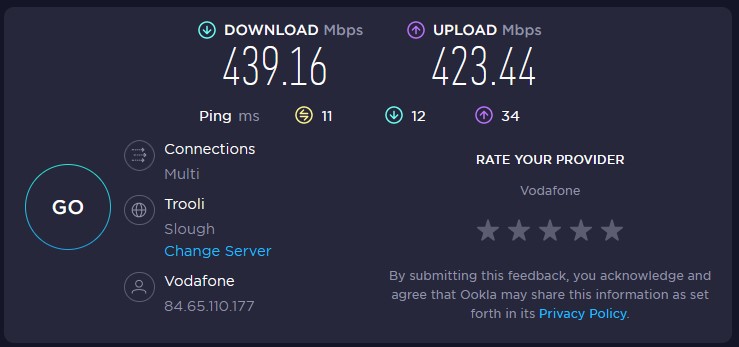
But after a week of settling in, today’s figures are…
The above speediest results are interesting, in that they show different speeds depending on whose test ‘app’ you are using.
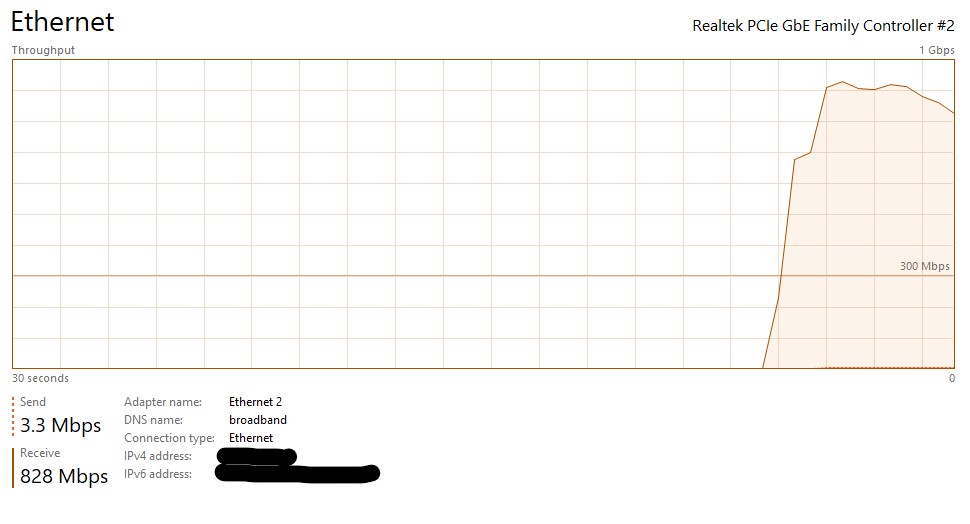
So here is another test. Using a fixed sized (one GB) file located at Thinkbroadband.com and using the Windows 10 Task Manager Ethernet window, you can see that the download speed is nearly at the top speed of the promised spec.
Downloading to various devices
What speed should we expect on your devices from a Full Fibre connection? – This is a good question. The package we went for was the Full Fibre Vodafone 900 (900 MB) at a very good price of £30.00/month for 24 Months with a guaranteed service level minimum of 450 MB.
So many factors can determine the speed of download and of course uploading (but who cares about that!!) some of which include the age of the device such as smartphone, tablet, laptop, desktop to name a few. The connection you have to the router, fixed or Wi-Fi. The distance you are from the router. The site from where you’re downloading and the number of people downloading the same item, such as a film for example and the number of people in your household using the connection. All in all, it can get quite frustrating if you’re not aware of the various pieces of the jigsaw.
For example, after the completion of installation, we could not get any faster than 95 MB download speed via a wired connection on an HP desktop that we have. It’s around five years old and we found that the on-board network connection on the motherboard itself was only rated for transfers of up to 100 MB. To overcome that restriction, we purchased a Gigabit PCI Express Network Adapter and as soon as that was installed, speeds then reach up towards the 700/850 MB.
In regard to Smartphones, Tablets and Laptops where you can’t physically change any hardware, you’re basically stuck with whatever hardware level it is at.
Here are some devices we have checked using Wi-Fi…
Device
Download Speed (MB)
Up Load Speed(MB)
Acer
90.5
80
Motorola G9
252
301
Galaxy Tab S5e
257
296
Galaxy Tab 10
51
39
HP Desktop (Wired)
680
550
HP Desktop (Wi-Fi)
420
380
Included the HP Desktop Wired Connection for comparison.
So that’s about it for now, but I think there is more testing and evaluation to be done, but with =out a doubt it is a very different world with FTTP.
My BT Infinity broadband figures for February delivered another good month of performance.
BT replaced the Infinity modem as part of their swap out plans, although I had not seen any problems with my original modem – manufacturing fault as far as I could see. Lets hope it continues.
OFCOM have just published their latest report about the state of the UK Broadband Speed. Makes for interesting reading. Still seems that there areas for improvement in delivery and the overall speed achievable in the UK. Full report can be found here.




 Beasley's Place